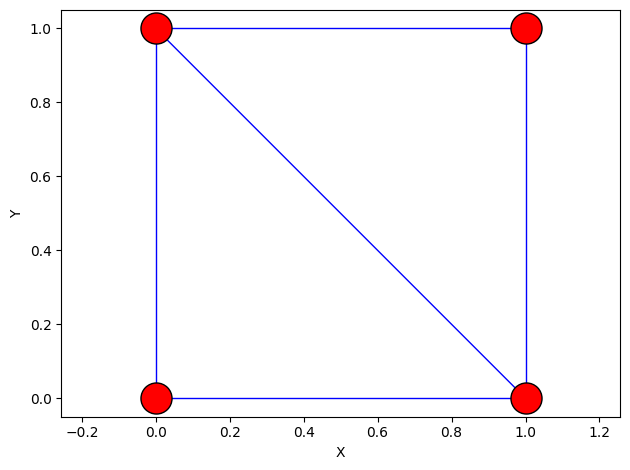
A lot of thought (and experience) went into designing how pnmlib reads, writes and stores simulation data. In this notebook we will outline all three of these operations.
The Row-Column RC Format
The data storage format used by pnmlib is based on the familar spreadsheet, meaning that data is stored in rows and columns, hence it is called the RC format. The names of the columns describe the data stored therein, and the row corresponds to the pore or throat index.
The main objectives of the RC data storage format are:
the data should be self-descriptive without extra metadata, and
the data should be stored in the simplest way possible
The first of these objectives can be accomplished by using a well-defined convention for the column names. The pnmlib naming convention is as follows:
where the items in < > are required and those in { } are optional. For example, the column named network/throat.diameter would contain the diameter values for all the throats in the network. With this convention it is obvious what data is stored in the column water/pore.temperature, which satisfies the self-descriptive aspect. Not only does the column name provide information about which values are stored there, but the group tells pnmlib how the simulation is structured.
To achieve the second goal of simplicity, pnmlib uses a standard Python dictionary (dict) to store data, where keys correspond to the column names, and the values are stored as numpy.ndarrays. Using a dict of numpy.ndarrays is more flexible than using a pandas.DataFrame and easier to use than advanced storage technologies like hdf5 or zarr. numpy.ndarrays are also numerically efficient and familiar so makes an ideal choice on many fronts.
As well as meeting the above two objectives, the rc format has a number of technical advantages as well, but these will be discussed in a different notebook. The remainder of this notebook will explore the details and usage of the RC data storage in pnmlib.
Basic Demonstration of the RC Format
Let’s start by manually defining at 2-by-2 network:
Np =4# Number of poresNt =5# Number of throatspn['pore.diameter'] = np.random.rand(Np)pn['pore.volume'] = np.pi/4*pn['pore.diameter']**2pn['throat.diameter'] = np.random.rand(Nt)pn['throat.length'] = np.ones(Nt)
We can convert the data on the network to a pandas DataFrame, which is ‘spreadsheet-like’ package in Python. One limitation of the DataFrame is that all columns must be the same length, which means that pore and throat data must be stored in separate tables. We can view just the pore data:
The resulting DataFrame has a nice default display format, so the self-descriptive nature of the format should be evident:
df
pore.coords
pore.diameter
pore.volume
0
[0, 0, 0]
0.447
0.157
1
[0, 1, 0]
0.309
0.075
2
[1, 0, 0]
0.493
0.191
3
[1, 1, 0]
0.601
0.284
Warning: Spreadsheet Software Does Not Like Multidimensional Data
Storing multidimensional data in a column causes most spreadsheet software to complain, or more likely to treat is as ‘text’. When outputting data like 'pore.coords' to an actual spreadsheet it needs to be further divided into 'pore.coords[0]', 'pore.coords[1]', etc. The functions in the io module deal with this accordingly.
We can do the same thing for throat data:
pnmlib.inspect.props_to_df(pn, element='throat')
throat.conns
throat.diameter
throat.length
0
[0, 1]
0.336
1.0
1
[0, 2]
0.488
1.0
2
[1, 3]
0.074
1.0
3
[2, 3]
0.569
1.0
4
[1, 2]
0.136
1.0
The Meaning of 'throat.conns'
The values in the 'throat.conns' array indicate which two pores are on either end of the throat, so throat 0 connects pores 0 and 1. Keeping in mind that a pore’s “index” is implied by its row. This is a deceptively simple format that is actually the sparse representation of the network’s undirected adjacency matrix in ‘COO’ or ‘IJV’ format.
Summary of the RC Format
Each column represents a different property of the pores and throats, like diameter or volume.
Each row contains the properties of single pore or throat.
The pore (or throat) index or identification number is implied by the row number on which that pore’s data is stored, so when we talk about pore 0, we are refering to the pore whose data is stored on row 0.
Multidimensional data like 'pore.coords' is all stored in a single column. This is possible because we use ndarrays rather than actual columns.
The column names must adhere to the convention. Naming conventions are discussed further below.
Reading and Writing Data: The Getter and Setter Functions
In order to keep things truly simple, pnmlib uses a standard python dictionary, with no subclassing. However, the standard python dictionary has no ability to interpret the dictionary keys (i.e. check validity or modify behavior based on the key), so pnmlib is based on using “setter” and “getter” functions, set_data and get_data, to write and read data in the dictionary. For instance, the following two cases are equivalent:
rc = {} # Standard python dictionaryrc['network/pore.diameter'] =2.0*np.ones(4)print(rc)
The advantage (or necessity) of using the set_data method is not evident in the above demonstration, and in fact it looks unnecessarily verbose, but the main point is that these functions ultimately just read and and write to a dictionary. As we shall see they do quite a lot more than that. Of course, it is possible to write directly to the dict, so long as the naming convention and data format requirements are met. However, using the set_data function provides consistency checks on the data so is good practice. Similarly, it is also possible to retrieve data from the dict directly, but using get_item provides a number of useful features and shortcuts as we shall see.
Naming Conventions: Valid Prefixes
Each dictionary key (i.e. column name) must be classified using one of the following prefixes:
'pore'
'throat'
'conduit'
'param'
'attr'
These prefixes tell pnmlib what type of data is stored in each key as explained below.
pore and throat
These refer to whether the array stored under the given key corresponds to pore or throat data. This is necessary to
differentiate between properties which may exist on both pores and throats, such as diameter for example, and
to ensure that all arrays are a consistent length (i.e. all arrays starting with 'pore.' must have the same number of rows as the network has pores).
Provided array is wrong length for network/pore.bar
conduit
This is used to indicate an array that has the same number of rows as the network has throats, but is 3 columns wide. The left and right columns contain data for the pores on each end of the throat, while the center column contains the throat data. For example, if throat i connects pores j and k, then row i of conduit.diameter will contain the diameters pore j, throat i, and pore k in each column respectively.
The term matrix is used to indicate arrays which are being stored for use by algorithms, particularly linear algebra related matrices, such as coefficient matrices. There are no requirements of limitations on data type or shape, since this prefix needs to accommodate all possible algorithms. The main motivating example for this prefix is the need to solve for multiple variables at once.
This is used to store numerical data that do not correspond to pore and throat locations, such as scalar values like barometric pressure or molecular weight:
This is used to indicate any non-numerical data. This data should be serializable, meaning it can be written to disk if the entire structure is saved. Strings are a common example of serializable data, whereas instantiated objects are not.
In addition to the reserved keywords, there are reserved symbols as well. These include:
.
/
*
@
|
These are explained in the following sections.
Properties and the . Symbol
As is already illustrated above, the . is used to separate the prefix from the property, such as 'pore.diameter'. What’s not illustrated is that the first . is always interpreted as the separation between the prefix and the property, while additional .’s are ignored. This means that . can be optionally employed to create sub-properties, like 'pore.bc.rate' and 'pore.bc.value'.
This is also useful for separating algorithms, which are often numerous.
Wildcards and the * Symbol
The * symbol is widely used as a wildcard in many software packages, meaning to match anything. In pnmlib it can be put at the end, for instance to find all the boundary conditions:
Often times only a subset of the locations are of interest. If a label (a boolean array) has been generated for that location, like 'pore.left', then it can be used as part of the dictionary key to mask only those locations:
The naming convention in pnmlib can tend to create long dictionary keys. Sometimes it is desired to have a sub-dictionary where the group information has been removed from the keys. In this case, the | symbol can be used in place of the \ symbol, and anything preceding the | will be trimmed from the dictionary keys in the returned dict:
If a true copy is required, the deepcopy function from the copy module can be used:
from copy import deepcopyrc3 = deepcopy(rc2)rc['network/pore.diameter'][0] =3.0print(rc2['pore.diameter'])print(rc3['pore.diameter'])
[3. 1. 4. 4.]
[2. 1. 4. 4.]
Data Types: Numerical, Boolean, and Scalar
pnmlib distinguishes between numerical data (i.e. float and int) and Boolean data (i.e. bool). The former are referred to as properties since they describe the physical properties of the pores and throats, like diameter. The latter are referred to as a label since it is essentially a flag that indicates if a condition is true on a given pore or throat.
Properties
Numerical data means things like pn['pore.diameter'], which is a vector full of numbers, either float or int. These are referred to as properties, or props, because they represent the physical properties of the pores and throats.
When writing property data, it is important that we give a value to every element. Even if all the values are the same, we still require that each location have a value. For instance, a simulation may be isothermal, so pn['pore.temperature'] is the same everywhere, but code is written to expect that temperature might vary, so assumes such properties can vary by location.
Labels
Boolean data, True and False are treated as labels. For example, a network may have an array called 'pore.left', with True values in all the pores that are on the left side of the network. Like property arrays they must also be full length array with one value for each element. It is common for most of the values to be False. The power of this format is that boolean arrays can be used as masks on numpy arrays. So we can find the diameter of all the pores on the left face of the network using pn['pore.diameter'][pn['pore.left']].
Additional Features of the get_data and set_data Functions
Not only do the get_data and set_data functions help enforce the naming convention, but they provide several additional convenient features.
Deleting Items by Assigning None
Because the data is stored in a standard python dict we can delete arrays using the del command. However, we can also use the set_data function by passing a value of None:
As mentioned above it is necessary to assign a value to every pore (or throat) even if they are all the same value. This is managed by the set_data function automatically:
The reason for this is a bit subtle. When running a pore-scale model it is normal to pass temperature='pore.temperature' to indicate where the temperature values are located. However, this feature can be used so that temperature=355 will directly return 355 instead of trying to lookup the array. For example: